Businesses in the US widely rely on data-driven decision-making to improve efficiency, manage costs, and stay competitive. However, there are a few elements that make informed decisions tough, such as manual reporting, limited visibility, and disconnected data sources. Power BI consulting services allow firms to address these challenges by connecting data from various systems and transforming them into insights.
Microsoft Power BI allows teams to design interactive dashboards, track KPIs, and simplify reporting. The guide explains the process of Power BI implementation, common challenges, and ways to measure success and ROI.
Power BI holds 36% market share in BI platforms with 300,000+ organizational customers and 15 million users (Microsoft, 2025). Mature BI implementations return $13.01 per dollar invested (Nucleus Research). Natural language query adoption in BI tools grew 120% since 2023, driven by Power BI Copilot integration.
What Is Power BI Implementation and Why Does It Matter?
→ Understanding Power BI Implementation
Setting up Microsoft Power BI to gather, integrate, analyze, and visualize corporate data is known as Power BI implementation. It includes Data connectivity, transformation, semantic modeling, dashboard creation, security, and deployment. Power bi implementation consultants allow businesses to transform complex data into actionable insights and make well-informed decisions by integrating data from many platforms.
→ Why US Businesses Are Investing in Power BI
• Teams can obtain consistent reports and make well-informed choices thanks to Power BI, which unifies data from several business systems into a single platform.
• When supported and planned refreshes are available, businesses can use real-time streaming to obtain timely information and react rapidly to changing circumstances.
• By automating data processing and reporting processes, Power BI minimizes human error and eliminates repetitive spreadsheet operations.
• Businesses may measure key performance metrics, identify trends, and keep an eye on their progress toward strategic objectives with the use of interactive dashboards.
• Teams can exchange reports and dashboards with power BI implementation services, which improve communication and give departments uniform business insights.

How to Know If Your Business Is Ready for Power BI Implementation
➯ Signs Your Business Needs Power BI
• Instead of concentrating on research and business expansion, your team spends hours gathering data, updating spreadsheets, and creating reports.
• It is challenging to develop a unified overview of business performance since information is distributed across several platforms. These data sources can be integrated with the assistance of a Microsoft Power BI consultant.
• Conflicting figures from several departments make it difficult to maintain data accuracy and make wise decisions.
• Leadership finds it difficult to monitor KPIs, obtain timely insights, and spot performance gaps before they impact corporate objectives.
• Growing data volumes, intricate analytical requirements, or changing company needs are too much for current reporting solutions to handle.
➯ Power BI Implementation Readiness Checklist
• Establish precise KPIs and business goals to direct the deployment of Power BI.
• Determine pertinent data sources and designate owners for efficient data management.
• To guarantee accurate, dependable, and consistent reporting, evaluate the quality of the data.
• Make sure Power BI deployment and integration are supported by your IT infrastructure.
• Stakeholders should agree on project objectives, reporting criteria, and anticipated results.
• Establish the resources, team roles, and budget needed for a successful deployment.
Also Read : Power BI Implementation Cost in USA: Complete Pricing Guide 2026
Measure Power BI Implementation Success and ROI
✧ Key Performance Indicators to Track
• To assess increases in team productivity, calculate the decrease in manual reporting time.
• To find out if Power BI produces more dependable and consistent results, monitor data accuracy.
• To find out how frequently employees use Power BI for everyday activities, track dashboard adoption rates.
• Assess the speed at which staff members may obtain company information and make wise choices.
• Determine how much reporting-related expenses, such as human labor and report upkeep, might be reduced.
• To evaluate Power BI’s impact on business results, keep track of how many business decisions are supported by analytics.
✧ Calculating the Business Value of Power BI
• Calculate the costs associated with implementation and operation, including those related to licenses, integration, training, and ongoing maintenance.
• Calculate the productivity gains and time savings brought forth by automated reporting and simplified data processing.
• Estimate measurable business advantages, including lower reporting costs, increased productivity, and faster decision-making.
• To assess ROI and determine whether Power BI satisfies predetermined organizational goals, compare the total benefits to the total costs.
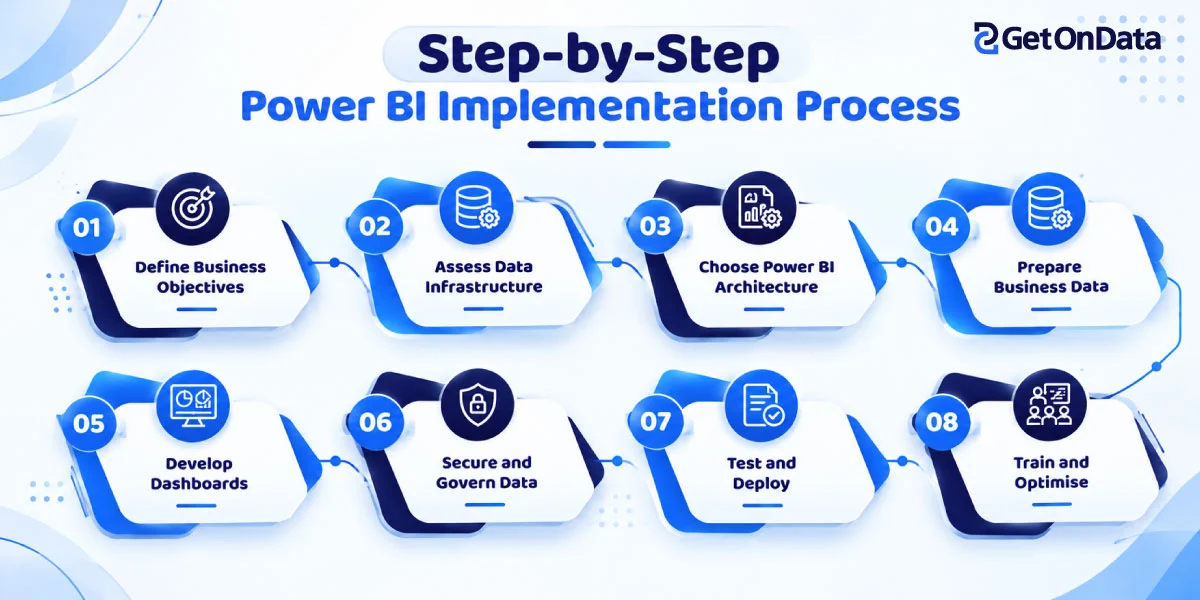
Step-by-Step Power BI Implementation Process
Step 1 – Define Business Objectives and Reporting Requirements
Determine the business objectives that your Power BI solution should support first. Establish key performance indicators (KPIs) to track progress and decide which departments require reports. Set reporting requirements in order of importance and business impact.
Establish measurable success criteria as well, such as quicker reporting, better forecasting, or improved decision-making. Setting clear goals allows your team to create relevant dashboards and guarantees that the Power BI solution adds significant business value.
Step 2 – Assess Existing Data Infrastructure
Analyze your current cloud, ERP, CRM, and accounting systems to find out where your company’s data is kept.Determine the integration needs and assess the consistency, accessibility, and quality of the data.
A Power BI expert in Chicago may evaluate your existing infrastructure and suggest appropriate integration techniques. Before connecting data sources, ensure that you evaluate security rules and compliance needs.This review creates a solid basis for execution and helps in early identification of potential issues.
Step 3 – Choose the Right Power BI Architecture
Choose a Power BI architecture that fits your data volume, reporting frequency, and business requirements. While Power BI Service facilitates cloud-based sharing and collaboration, Power BI Desktop helps with report development.
Examine alternatives for hybrid, on-premises, and cloud connectivity. Depending on your needs for performance and data freshness, pick from Import, DirectQuery, and Direct Lake.In order to balance functionality, scalability, security, and implementation costs, evaluate the licensing and capacity requirements.
Step 4 – Prepare and Integrate Business Data
Start by gathering information from pertinent corporate systems, such as cloud databases, ERP, CRM, and finance platforms.
Prior to analysis, clean, transform, and standardize datasets using Power Query. Next, create reusable semantic models that reliably specify relationships, computations, and business metrics.
To keep reports current, set up regular refresh procedures. Accuracy is increased, redundancy is decreased, and BI and reporting are established through proper data preparation.
Step 5 – Develop Power BI Dashboards and Reports
Create reports and dashboards that transform corporate data into insights that can be put to use. Start with executive-level dashboards that show trends and KPIs.
Next, produce department-specific reports for operations, marketing, sales, and finance. Utilize drill-down tools, filters, and interactive visualizations to make information exploration simple for consumers.
Ensure that each dashboard is in line with the established corporate goals. A user-focused design improves the value of reports and allows for quicker, better decision-making for stakeholders.
Step 6 – Implement Data Security and Governance
Before releasing reports to users, establish robust security and governance procedures. To manage access to workspaces, datasets, and reports, set up role-based permissions.
To limit data visibility based on user roles or organizational responsibilities, utilize row-level security. Establish precise guidelines for data ownership and access.
Examine relevant US industry rules such as HIPAA for sensitive healthcare data. Frequent security evaluations promote crucial data management and help protect sensitive information.
Step 7 – Test and Deploy Power BI Solutions
Verify report calculations, data accuracy, update schedules, and dashboard performance prior to release. Verify that reports satisfy business needs by conducting user acceptance testing with representatives from relevant departments.
Prior to launch, address usability concerns and resolve inconsistencies. To manage releases across development, testing, and production environments, set up workspaces, access rights, and deployment pipelines.
Distribute the authorized reports to business users and set up a procedure for gathering feedback and fixing problems that arise after launch.
Step 8 – Train Employees and Monitor Performance
Give employees practical training so they can use dashboards, apply filters, understand KPIs, and produce insights on their own.
Promote adoption by showcasing how Power BI helps with daily choices and departmental objectives.
After deployment, keep an eye on user feedback, query performance, report utilization, and refresh consistency. Determine which dashboards are underutilized and optimize reports that load slowly or contain extraneous data.
To maintain the Power BI solution’s effectiveness with changing business requirements, establish continuous support and frequent evaluations.
Common Power BI Implementation Challenges and How to Overcome Them
✦ Poor Data Quality and Inconsistent Reporting
Incompatible reports and inaccurate insights might result from poor data quality. Prior to analysis, standardize data formats, eliminate duplicates, and verify information. To guarantee that every department uses reliable, cohesive business KPIs, establish transparent data ownership and uniform KPI definitions.
✦ Complex Data Integration Requirements
Compatibility and connectivity problems may arise when integrating data from several ERP, CRM, cloud, and legacy systems. Businesses may choose appropriate connectors, optimize data pipelines, and set up reliable integration procedures that provide consistent reporting with the help of Power BI consulting services.
✦ Performance Issues with Large Datasets
Dashboard performance may be delayed by large datasets and intricate computations. Optimize data models, eliminate unnecessary columns, use effective DAX techniques, and set up suitable storage modes. As data volumes rise, keep an eye on query performance to ensure quick reporting.
✦ Security and Data Governance Gaps
Sensitive company data may be compromised by lax access controls. Establish defined data governance guidelines, set up row-level security, and implement role-based permissions. To safeguard data across the Power BI ecosystem, conduct frequent access assessments and keep an eye on compliance needs.
✦ Low Employee Adoption
If dashboards appear complex or irrelevant, employees may be resistant to Power BI. Give practical instruction, produce clear reports, and highlight useful advantages. To promote adoption across departments, collect user input on a regular basis and involve important stakeholders early on.
✦ Unexpected Implementation Costs
Additional integrations, licensing, data preparation, and training needs might raise the cost of implementing Power BI. Establish the project’s scope, project continuing costs, and assess licensing requirements in advance. Throughout implementation, keep an eye on spending to reduce unforeseen expenses and budget overruns.
Also Read : 7 Best Power BI Consulting Companies in Las Vegas
How to Choose the Right Power BI Implementation Partner in the USA
❖ Evaluate Technical Expertise and Microsoft Ecosystem Experience
Select a Power BI consulting company who has established proficiency with Power BI within the Microsoft ecosystem. Verify their familiarity with SQL, Azure, Microsoft Fabric, and data modeling. Scalable business intelligence systems, dependable reporting, and smooth integration are possible with strong technical capabilities.
❖ Review Industry Experience and Client Case Studies
Examine relevant client case studies and the partner’s experience in your sector. Seek out effective implementations that show measurable benefits in decision-making, data visibility, and reporting efficiency. Determine experience and skills of Power BI consultant in Chicago by testimonials from clients and project success.
❖ Assess Data Security and Governance Capabilities
The power bi implementation companies should be aware of best practices for governance, access control, and data security. Inquire about encryption, row-level security, role-based permissions, and industry-specific compliance requirements. Maintaining regulatory compliance and safeguarding confidential company data are two benefits of a robust security strategy.
❖ Understand Pricing, Project Scope, and Support Models
Before deciding, evaluate project deliverables, pricing structures, implementation schedules, and choices for ongoing assistance. To prevent unforeseen costs, make license, integration, training, and maintenance costs clear. Choose a power bi implementation partner delivering straightforward pricing and support that suits your long-term business objectives.

Turn Your Business Data Into Strategic Decisions With Power BI
A well-planned strategy for Power BI implementation helps businesses gather scattered data into actionable insights. Prioritize data readiness, strong governance, and employee adoption to achieve long-lasting value. Collaborating with an expert Power BI services company can reduce implementation risks and improve outcomes. Measure your business needs to design a scalable environment.

 Manufacturing Data Analytics